
See the work your patients do at home.
You set the plan. SCRENR coaches your patients through it on their own phone and shows you how it went, so the time between visits stops being a blank.
Your week with SCRENR
- 1
Prescribe in a couple of minutes
Start from a template or your own exercises, set sets, reps and how strict the coaching is, and the patient gets a text to sign in.
- 2
The patient trains at home
Their phone counts each rep and corrects them as they move, against the range you prescribed.
- 3
You see who needs you
Today lists who is in pain, who has gone quiet, who messaged and whose plan is ending. Everyone else is on track.
- 4
Open a session when it matters
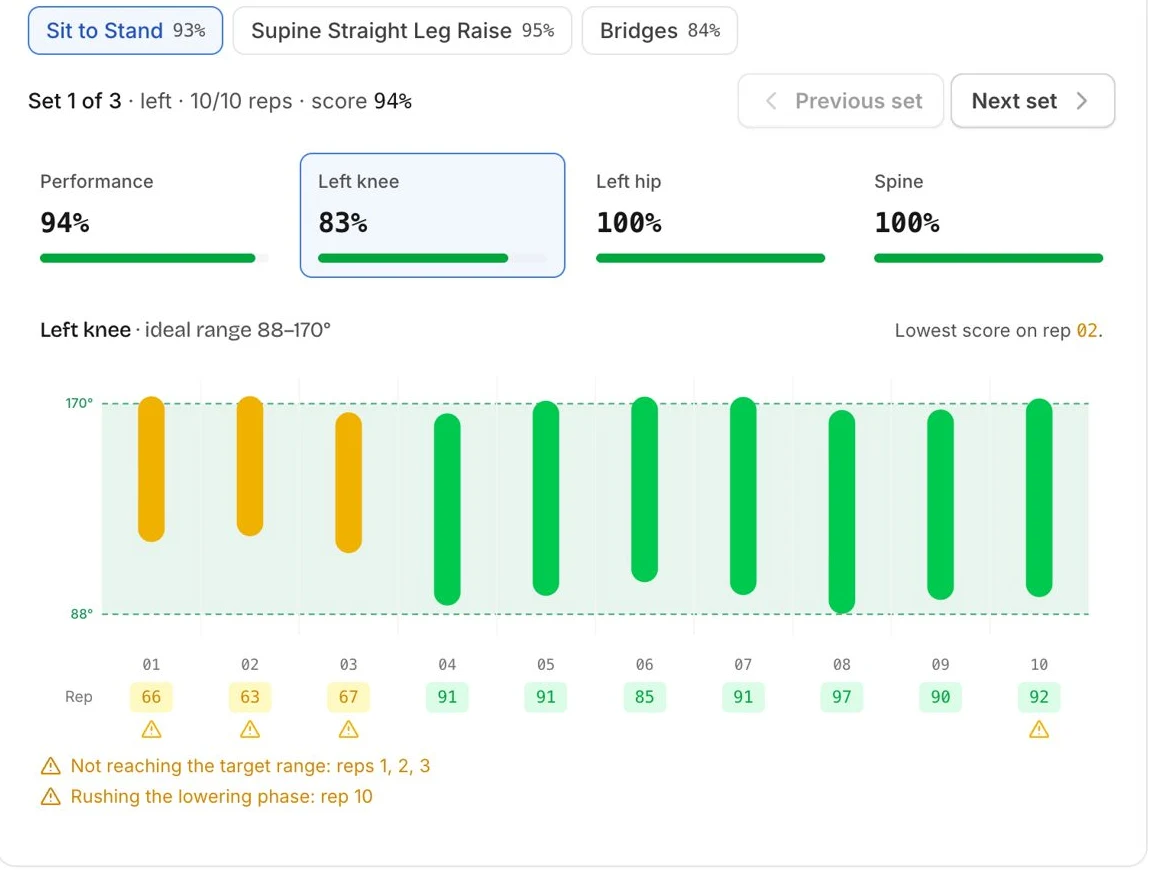
Every exercise, set and rep, with the range of motion against the ideal band and the form faults that repeated. Adjust the plan from there.
Questions therapists ask
- Do I have to watch video?
- No. Video stays on the patient's phone. You see what was measured: reps, range of motion, form faults and the pain they reported.
- Does it make clinical decisions?
- No. You write the plan, set how strict the coaching is for each patient, and decide what changes. SCRENR coaches the reps you prescribed and tells you how they went.
- How much of my time does it take?
- Prescribing takes a couple of minutes. After that, Today tells you who needs a look, so you are not reading every patient every day.
- What about RTM?
- Each code is tracked on its own clock: days with data for device supply, minutes for treatment management. You log time in a few seconds, and your biller gets a list of what qualifies. Billing stays with your clinic.
- What if a patient has pain?
- They can stop and say how bad it is. A stop for pain, or high pain after a session, goes straight to your attention queue.
- What do patients need?
- An iPhone and some floor space. Your clinic enrolls them; there is nothing for them to buy.
Want to see it with your own caseload? Book a demo, or read how a rep gets measured.